The operating system for independent property agencies
Manage the working week across sales, lettings, properties, tenancies and agency operations from one clear system. It is built around how an independent estate and letting agency actually runs, not a general-purpose CRM relabelled.
Most agency software answers “where is the record for this property?”. That is a filing question, and filing was never the hard part. The hard part is knowing what is waiting on you this morning, what lands this week, and what is actually in the diary. Branvia is built around those three questions, in that order.
Today
What needs attention now
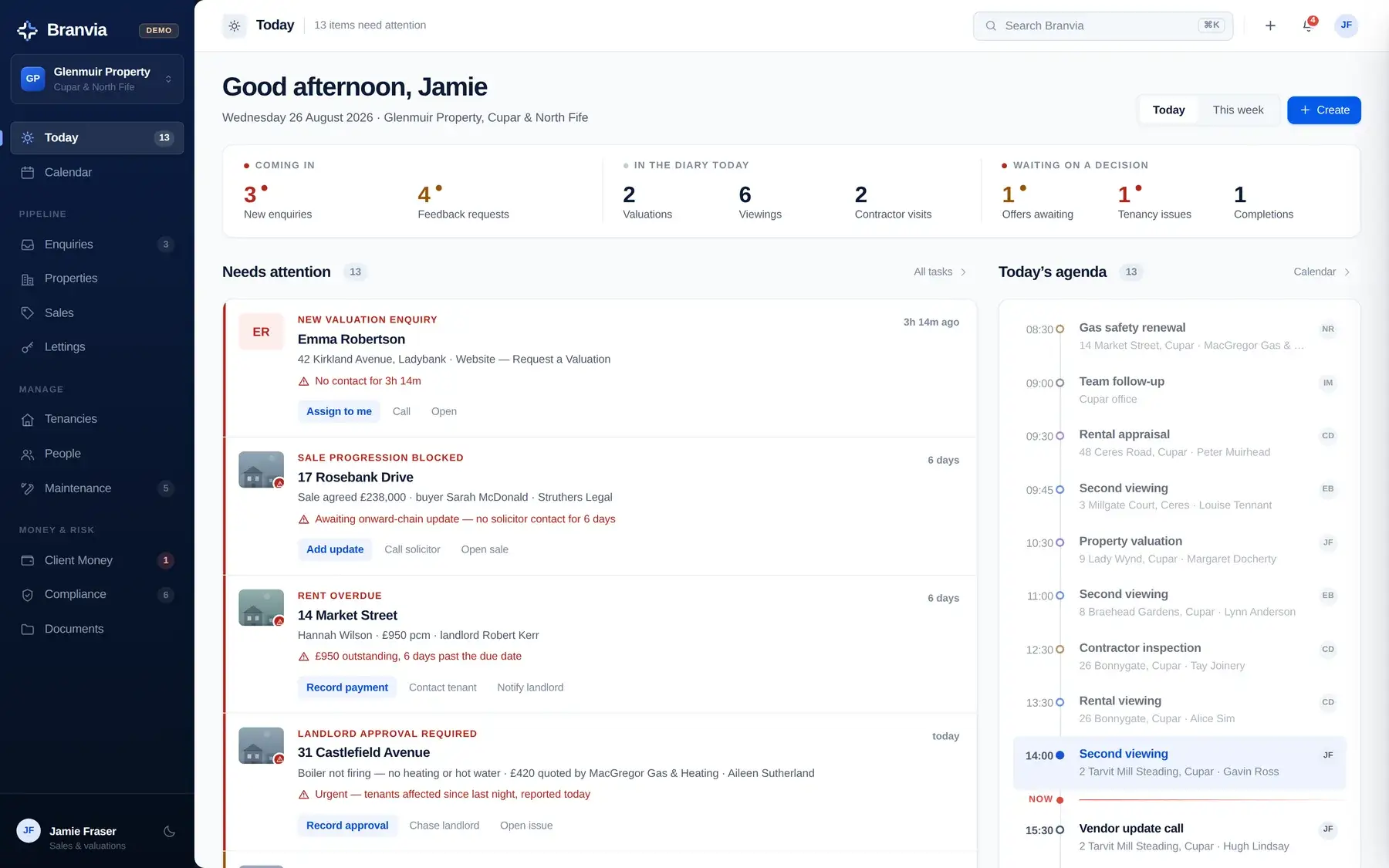
Today opens on a queue, not a dashboard. Each item is something that has gone past a point it should not have: a valuation enquiry that has sat uncontacted, a sale where the solicitor has gone quiet, rent that has not arrived, a landlord approval holding up a repair.
Every item carries its own actions (assign it, call, record the payment, log the update), so the queue is somewhere work gets done rather than a list of things to feel bad about. Alongside it sits the day's agenda, with a line marking where you are in it.
Today: the attention queue and the day's agenda, with a now marker.
This week
What is due, and what is going to bite
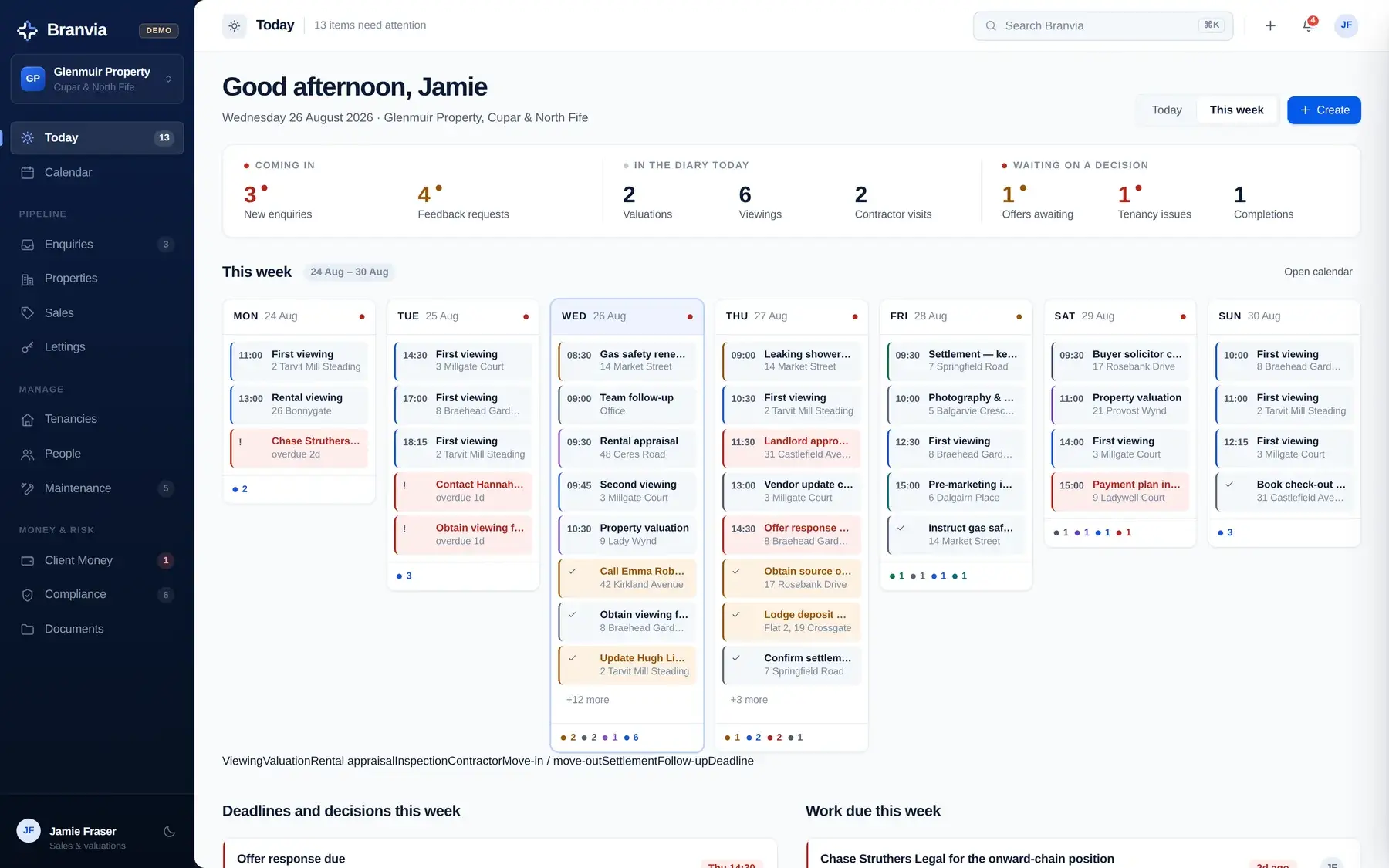
The same screen switches to the whole week: seven columns, every appointment and every task due, with deadlines and overdue work marked so a heavy day is visible on Monday rather than discovered on Thursday.
Underneath it, the week's deadlines and decisions are pulled out on their own: a settlement date, an offer response promised to a buyer's agent, an arrears instalment falling due.
This week: seven days at once, with deadlines separated out.
Calendar
What is actually happening across the agency
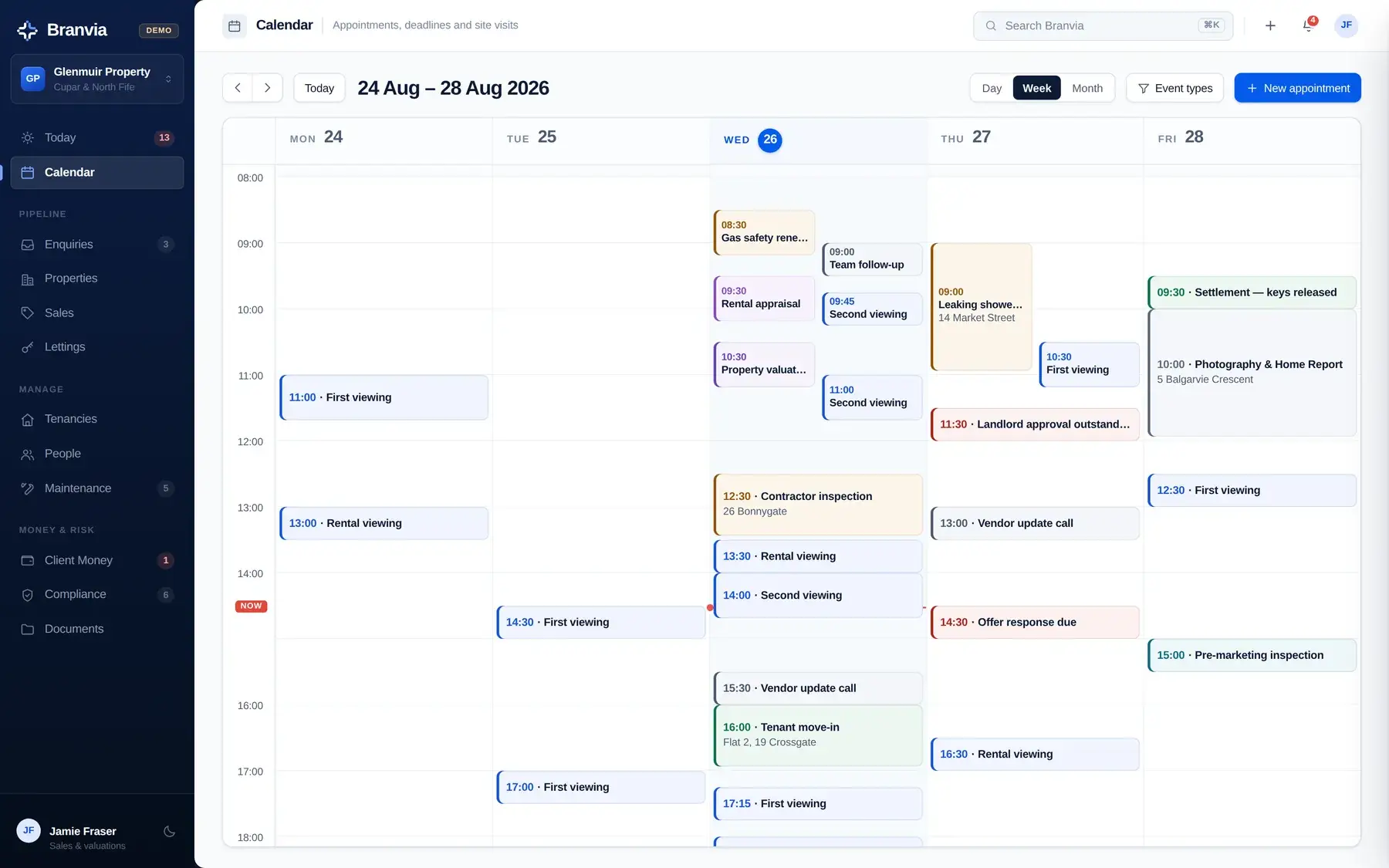
Valuations, rental appraisals, viewings, inspections, contractor visits, move-ins, check-outs, settlements, follow-up calls and deadlines, in day, week or month view, colour-coded by type and filterable down to just the kinds you want to look at.
Overlapping appointments are laid out beside one another so the titles stay readable on a busy morning. Compliance expiry dates and rent review dates appear here too, read from the property record rather than typed in twice.
Calendar: week view, colour-coded by appointment type.
What Branvia organises
The things that go wrong quietly
None of these are dramatic. Each one is a small thing that stopped moving while everyone was busy with the thing in front of them. Each is surfaced by Branvia as an item with actions against it, not as a number on a chart.
A valuation enquiry nobody has called backThe enquiry that arrived through the website first thing and is still sitting there at lunchtime. Branvia flags it against a response target and offers assign to me, call and open on the item itself.
A sale that has stopped movingMissives are not concluded, the searches are back, and the onward chain has produced nothing for six days. The milestone is marked blocked rather than left looking merely incomplete.
An offer the vendor has not answeredSitting against the asking price, with the buyer's own position recorded next to it: whether they have sold, and whether their due diligence file is complete.
Viewing feedback the vendor is waiting onBranvia counts the viewings that have happened with nothing recorded against them, and names the vendors who are waiting.
Rent that has not arrivedCounted in days past the due date, against the tenancy and the tenant, with record payment, contact tenant and notify landlord on the item.
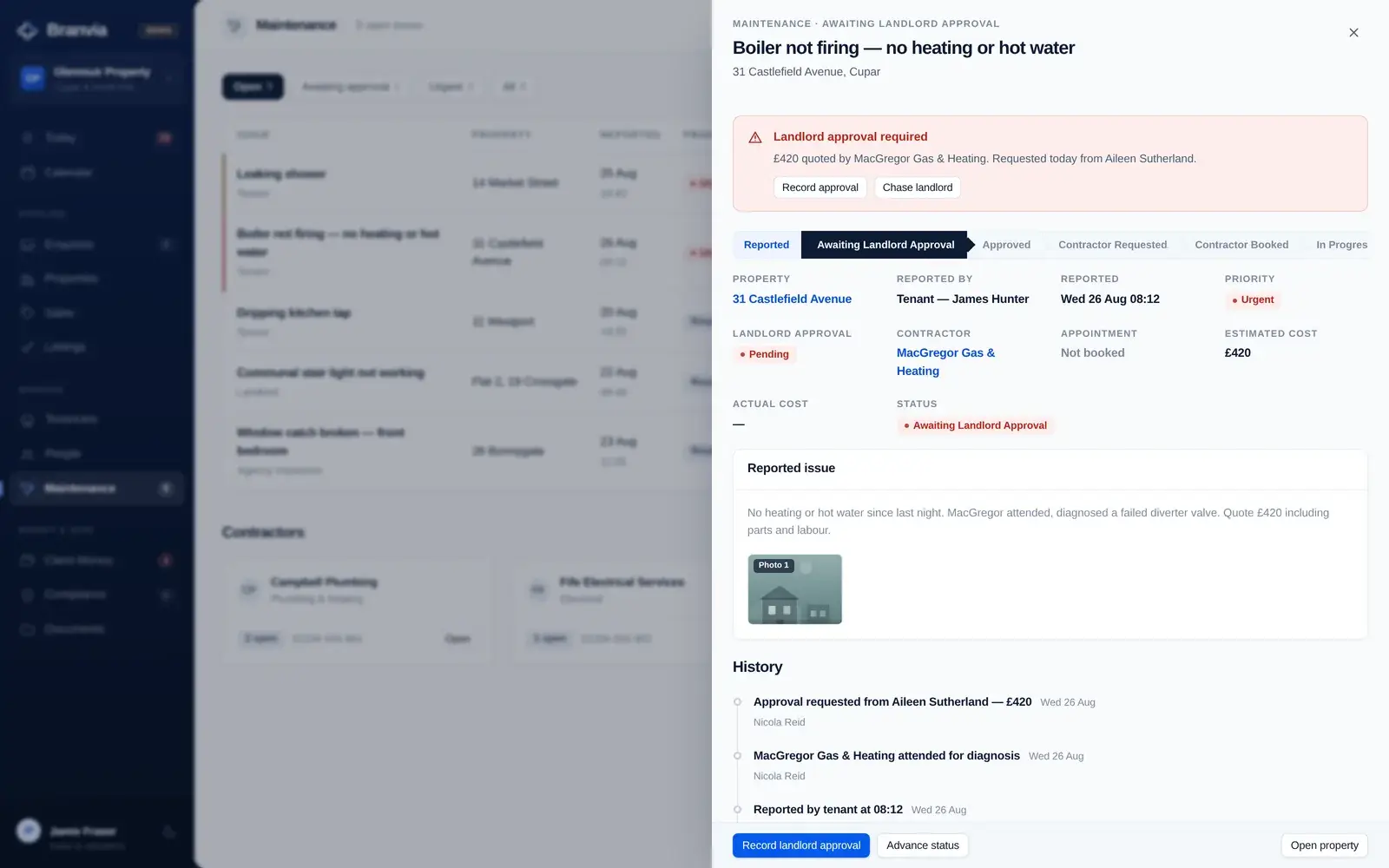
A repair waiting on the landlordThe tenants have no heating, the contractor has diagnosed the fault and quoted, and the job cannot proceed until the landlord replies. Branvia holds it at awaiting landlord approval rather than letting it look booked.
A due diligence file with something outstandingIdentity and address recorded, source of funds still not evidenced. It is named as the specific gap, on the specific file, before the transaction relies on it.
A certificate about to run outGas safety, EICR, landlord registration and the rest, counted down in days from today rather than sitting in someone's memory or a spreadsheet tab.
Money on the client account that is not posted anywhereA receipt with a reference nobody has matched to a tenancy. Until it is allocated, the bank and the client ledger will not agree. Branvia says so in those words.
A deposit taken but not yet lodgedReceived, sitting on the client account, and not yet with a scheme. It is flagged against the tenancy that is about to start.
The queue is derived, not maintained.
Nothing in it was flagged by a member of staff. Each item exists because of the state of an underlying record: a due date passed, an approval not given, a certificate inside thirty days, a receipt with no allocation. Dismiss one and it returns if the underlying record still says so.
A guided tour
Six areas, one underlying record
A property, a person and a tenancy each exist once. Every screen below is a different way of working with the same records, which is why a landlord who is also selling appears as one person, not two.
Valuation lead
Valuation booked
Instruction won
Preparing listing
On market
Viewings
Offer received
Sale agreed
Progressing
Missives concluded
Completed
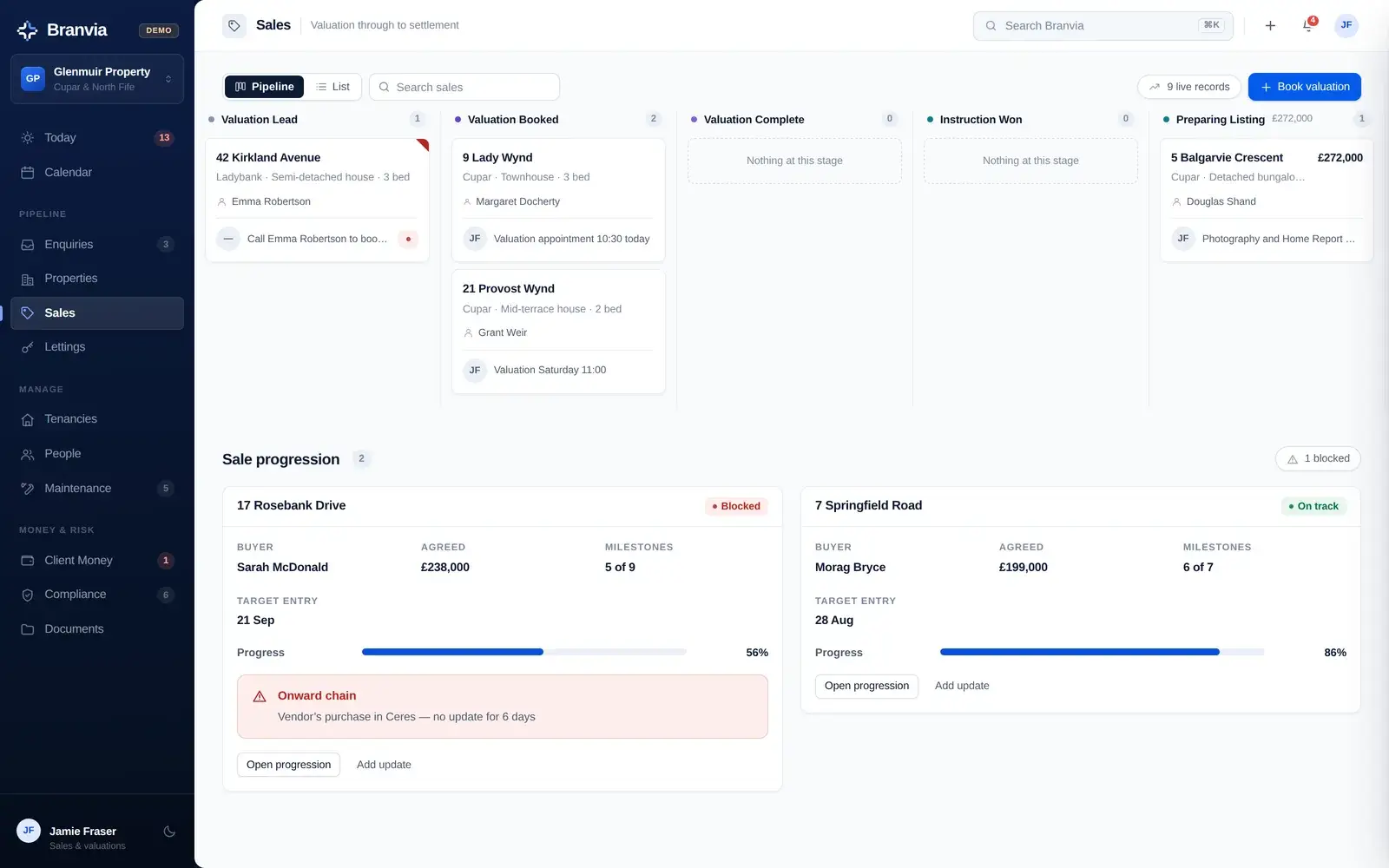
Every instruction, at the stage it is actually at
Eleven stages from valuation lead to completed, as a board or a list. Each card carries the owner, the viewings and offers against it, and how long it has been on the market, with the next action written on the card rather than held in someone's head.
Sales: the pipeline board, with sale progression beneath it.
Days on market shown on the card, so a stale instruction is visible rather than inferred
Viewings and offers counted against each property
Offers recorded with the buyer's chain position and the decision taken
Listing and publishing state per property, with an editor and preview
The part that actually loses time
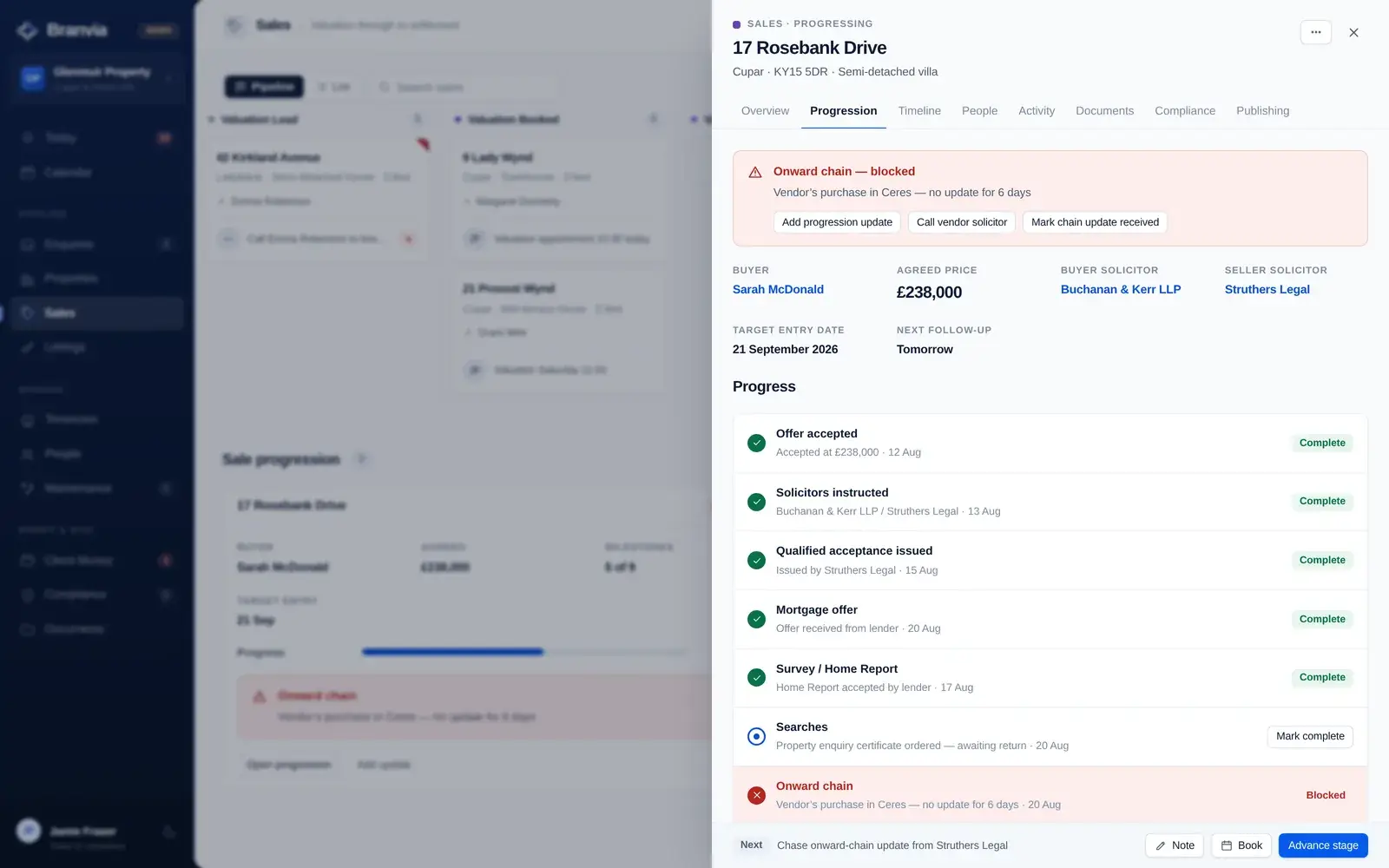
Once a sale is agreed, the work stops being marketing and becomes chasing. Branvia holds the milestone chain for the transaction (offer accepted, solicitors instructed, mortgage offer, survey, searches, onward chain, missives, settlement) and marks the one that is blocked as blocked.
The property workspace, on its progression tab.
Both solicitors named on the transaction, callable from the record
Dated progression updates, so “when did we last hear anything?” has an answer
Target entry date and the next follow-up held on the sale
A vendor-facing progression update can be generated from the same record
Landlord instruction through to move-in
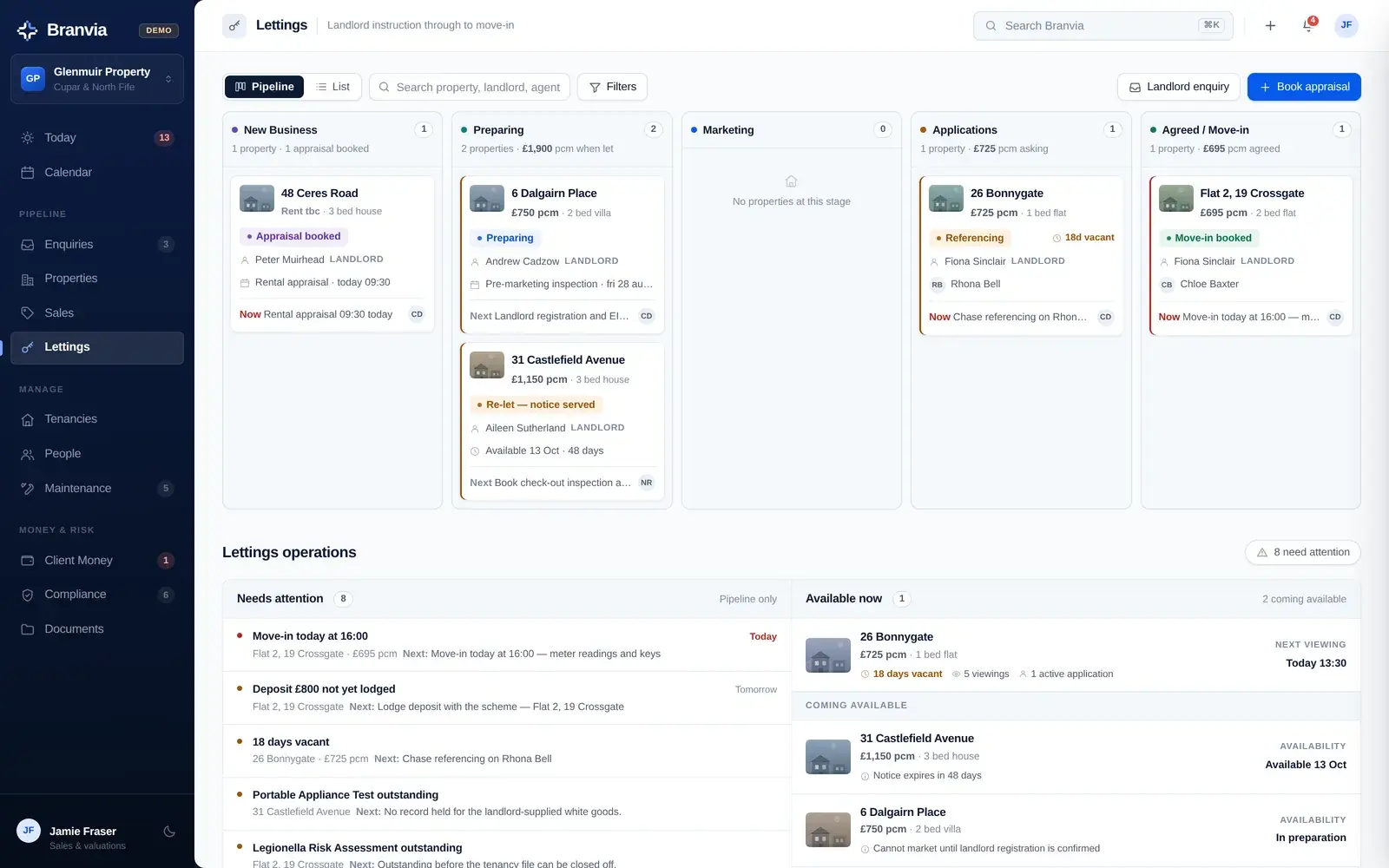
Lettings runs as five lanes (new business, preparing, marketing, applications, and agreed or move-in) with a vacancy count on each property and the applications underneath. Once the tenant is in, the tenancy takes over: rent, deposit, inspections and payment history live on that record rather than cluttering the pipeline.
Lettings: the board, with the operations panel beneath it.
Days vacant counted on every marketed property
Rent due, received and outstanding, with the payment history behind it
Deposits tracked as protected, release pending or not yet lodged
Rent review and end dates surfaced before they arrive, not after
Joint tenants held as separate people on one tenancy
What is held, whose it is, and whether it agrees
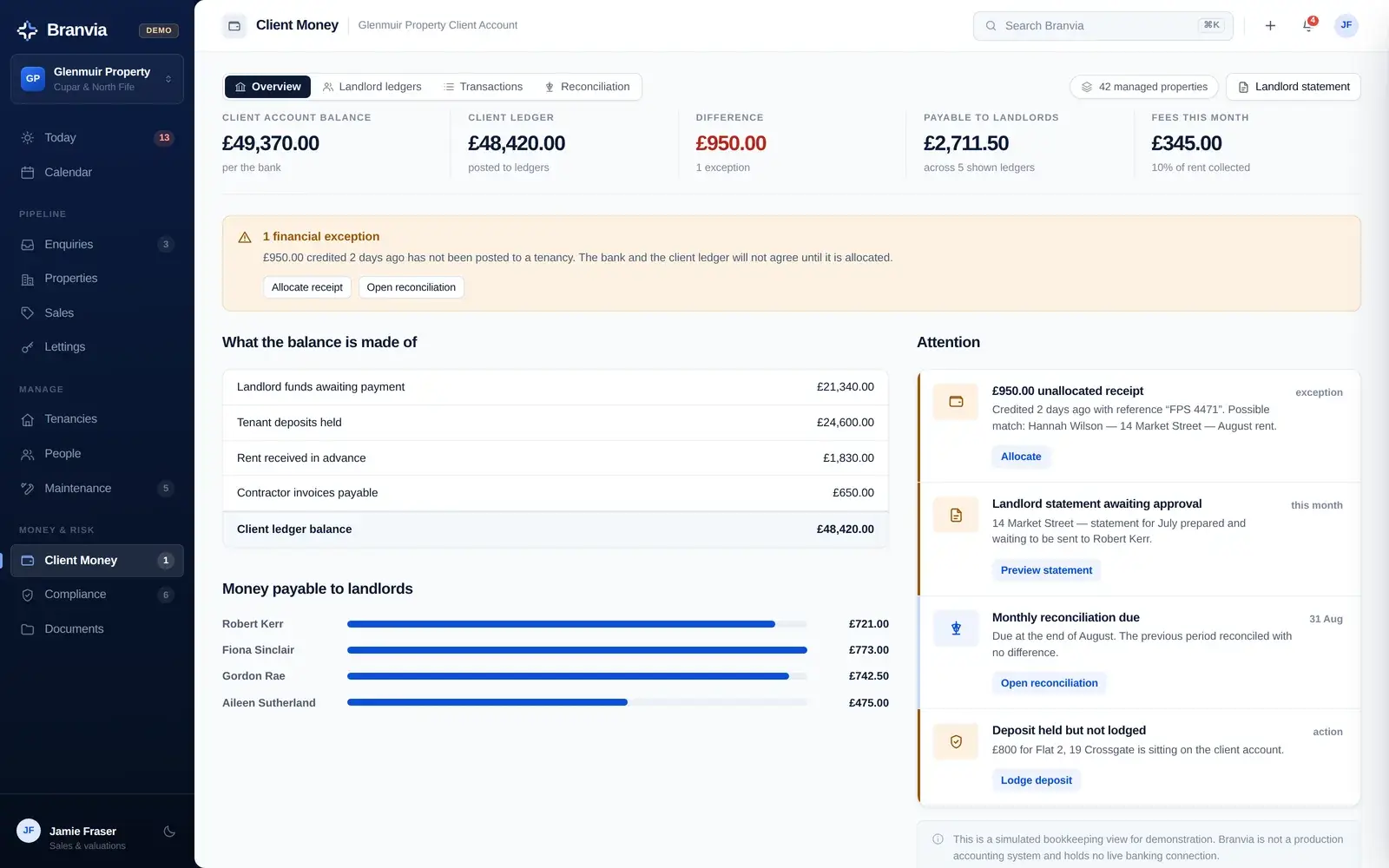
Client money is shown as the bank position against the client ledger, with the difference stated plainly and every landlord ledger listed underneath. Where the two do not agree, the exception is named. Typically it is a receipt that has not been posted to a tenancy.
Client money: composition, landlord balances and exceptions.
Landlord ledgers with rent in, fees, deductions and the balance held
Unallocated receipts raised as exceptions, with a suggested match
Reconciliation for the current and previous period, with the difference stated
Landlord statements generated from the ledger rather than rebuilt by hand
Branvia is a bookkeeping and visibility layer for client money. It is not an accounting package, it holds no banking connection, and it does not replace your accountant's controls or your firm's own client-money obligations.
The record, the evidence and what is still missing
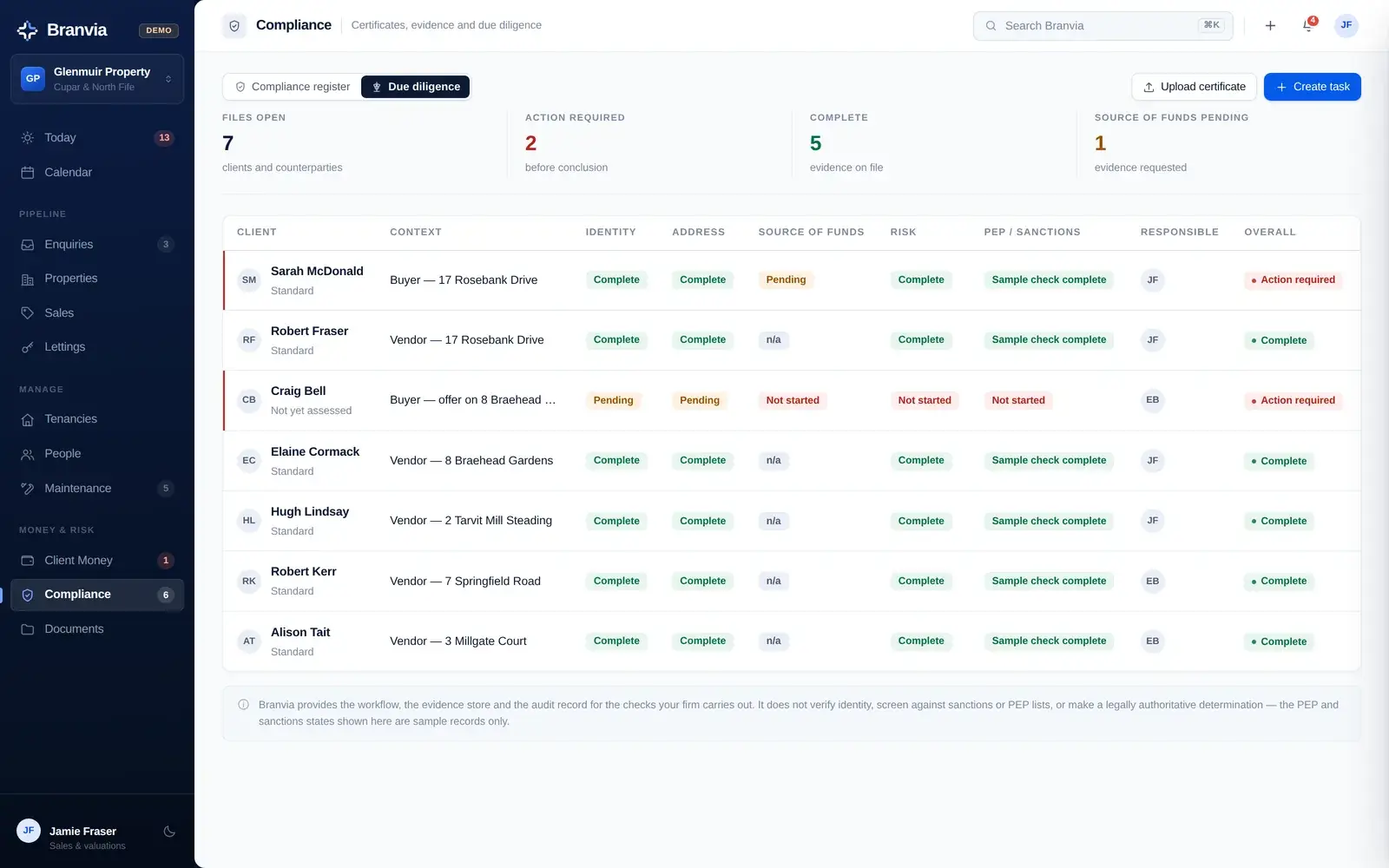
Two registers. Certificates (gas safety, EICR, EPC, landlord registration, legionella, interlinked alarms), each with its issue date, expiry, the person responsible and the document. And due diligence files, showing identity, address, source of funds, risk assessment and screening as separate states rather than one tick.
Due diligence: each check tracked separately, not as one tick.
Expiry countdowns from today, with expiring and outstanding separated
Outstanding requirements: where no record is held at all
Evidence held listed on each file, with the named gap called out
A responsible person against every record
Branvia records the checks your firm carries out, who carried them out and what evidence is held. It does not certify a property, carry out inspections, verify identity, screen against sanctions or PEP lists, or make any legally authoritative determination.
Reported, approved, booked, done
A maintenance issue moves along a defined chain: reported, awaiting landlord approval, approved, contractor requested, booked, in progress, completed, closed. The approval step is a real gate. An urgent repair with no landlord reply stays visibly stuck rather than appearing to be in hand.
A maintenance issue, held at landlord approval.
Urgent and routine separated, with who reported it
Estimate against actual, recharged to the landlord ledger when closed
Contractor appointments appear on the agency calendar
A works instruction with the approved spend limit can be generated
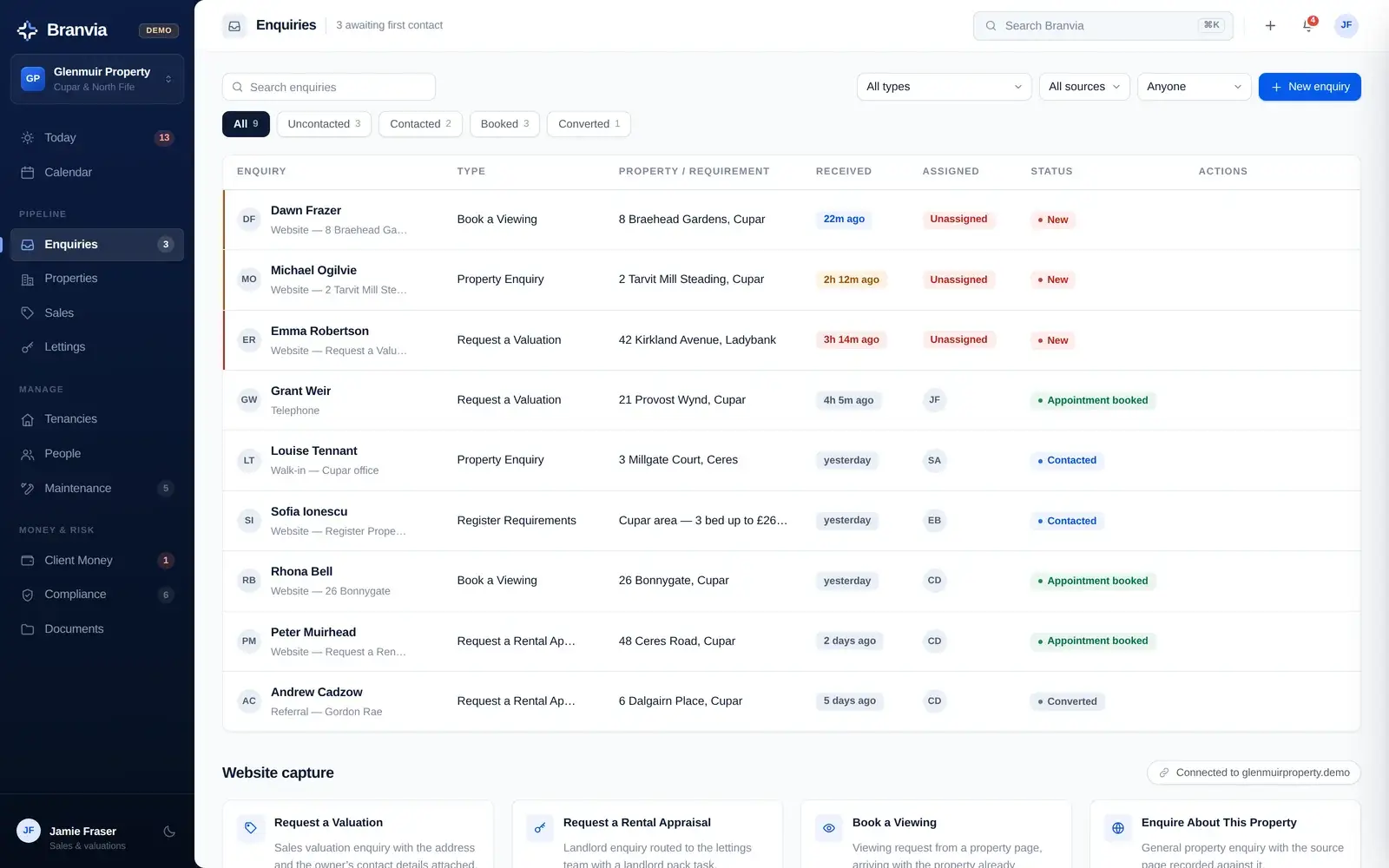
Branvia's demonstration models the agency website as the front of the same system: an enquiry arrives with the form it came from and the property it was about already attached, and that source stays on the record through to the sale or the tenancy that results.
A seller
01Someone visits the agency website
02Requests a valuation
03Enquiry lands in Branvia, address attached
04Assigned and called back
05Valuation booked into the calendar
06Instruction won, listing prepared
07Viewings, offers, sale progression
A landlord
01Landlord requests a rental appraisal
02Enquiry lands in Branvia, routed to lettings
03Appraisal booked
04Property instructed and prepared
05Viewings and application
06Move-in, deposit lodged
07Tenancy running: rent, inspections, maintenance
Enquiries: every route in, with the source retained on the record.
What the website forms map to.
The demonstration models six capture routes (request a valuation, request a rental appraisal, book a viewing, enquire about this property, register requirements, and general contact), each arriving as a record with its source page attached rather than as an email in a shared inbox.
Form submissions are simulated in the demonstration. Connecting a live Central Systems website to Branvia is delivery work we scope with you. It is not a switch that is already flipped, and Branvia has no property-portal, accounting or payment integrations in this build.
Simple pricing
Priced on the size of your agency, not per property.
How much does Branvia cost?
Branvia is £120 per month for smaller independent agencies, with up to 5 staff users and up to 100 active properties. Agencies with more staff or a larger active portfolio move to Branvia Agency at £149 per month. Larger and multi-branch operations are quoted individually, as are agencies combining Branvia with a wider Central Systems project.
How we decide your planWhichever threshold you exceed first, staff users or active properties, determines the plan. Four staff with 180 active properties is Branvia Agency; so is nine staff with 80.
What counts as an active propertyOne you are currently working: being marketed, progressed through a sale, let, or actively managed. Archived, completed and historic records do not count.
The same software on every planThe plans differ by the size of the agency using Branvia, not by what Branvia does. A monthly subscription, not charged per property or per transaction.
Three ways agencies take it
On its own, or as part of a wider system
Branvia is a real product rather than a bundled extra, so it works on its own. It is more useful when the website in front of it is feeding it.
Branvia on its own
You already have a website you are happy with, and the problem is the operational side. Branvia runs the sales and lettings work; the website stays where it is.
We build the agency website and connect its enquiry journeys into Branvia, so a valuation request or a viewing enquiry arrives as a record with its source attached rather than as an email.
Branvia sits alongside Berevia for independent funeral directors and Recovery Desk for vehicle recovery operators. Each was built for one industry and models that industry's actual work. See them together on industry management software.
Straight answers
Questions agencies ask about Branvia
What is Branvia?
Branvia is estate agency and lettings management software built by Central Systems for independent property agencies. It holds the operational side of the business in one place: enquiries, properties, the sales pipeline and sale progression, lettings and tenancies, rent, client money, deposits, maintenance, compliance and due diligence records, people and documents, all organised around Today, This week and the Calendar. You can open the demonstration and use it without signing up.
Who is Branvia designed for?
Independent estate agents, independent letting agents and combined sales-and-lettings agencies of roughly one to twenty staff. The demonstration is built around a single-branch Fife agency running both sides of the business, with a managed lettings portfolio, a live sales pipeline and one member of staff covering sales and valuations.
Does Branvia handle both sales and lettings?
Yes, as two separate pipelines over shared records. Sales runs from valuation lead through instruction, listing, viewings, offers, sale progression and completion. Lettings runs from landlord lead and rental appraisal through preparing the property, viewings, application, move-in, an active tenancy and on to renewal or notice. A person who is both a landlord and a vendor exists once, holding both roles.
Can Branvia work with a Central Systems website?
That is the intended pairing. The demonstration models the agency website as the front of the same system, so a valuation request, rental appraisal request, viewing request or property enquiry arrives as a record with the form and the property already attached. Connecting a live website to Branvia is delivery work we scope with you rather than something already switched on.
Can Branvia be used on its own?
Yes. Branvia is a product in its own right, not a bundled extra. If your website is fine and the operational side is the problem, Branvia can be taken on its own at the standalone price.
How much does Branvia cost?
Branvia is £120 per month for smaller independent agencies, with up to 5 staff users and up to 100 active properties. Agencies with 6–15 staff users or 101–300 active properties are on Branvia Agency at £149 per month, and whichever threshold you exceed first determines the plan. Larger and multi-branch operations (more than 15 staff users or more than 300 active properties) are quoted individually, as are agencies combining Branvia with a wider Central Systems website, automation or business systems project. Active properties are the ones you are currently working: being marketed, progressed through a sale, let, or actively managed. It is a monthly subscription and is not charged per property, per tenancy or per transaction.
Is the demonstration using real customer data?
No. Everything in it is fictional sample data for a made-up agency. The people, properties, tenancies, money and documents are all invented for demonstration. Nothing in the demonstration is connected to a live system, no data leaves your browser, and any change you make there affects only your own session.
Does Branvia replace my accounting or compliance systems?
No, and it is worth being clear about this. Branvia gives you a bookkeeping and visibility layer over client money (landlord ledgers, what is held, what is payable and where the bank and the ledger disagree), but it is not an accounting package and holds no banking connection. On compliance it records the certificates, the dates, who is responsible and what is outstanding; it does not certify a property, carry out inspections, verify identity or screen against sanctions lists, and it does not replace your firm's own obligations or your accountant's controls.
What does Branvia not do?
In this build there are no property-portal integrations, no accounting or payment connections, no SMS or email automation, no identity-verification service, no digital signatures and no separate mobile, tenant or landlord apps. Portal publishing states, document generation and form capture are modelled in the demonstration rather than connected to third parties. If something matters to you and is not there, ask before you buy rather than after.
See it for yourself
See how Branvia organises the working week
Across sales, lettings and property operations, open the demonstration and use it as though it were your agency. Nothing to install, nothing to sign up for.