New: Try our free Website Audit tool. Run your free audit →Run it free →

Recovery Desk logoRecoveryDeskA Central Systems product

Vehicle recovery management software built around the job

One operational view of enquiries, dispatch, units and drivers, the job book, clients, invoicing and the money behind it — built around the way a recovery operator actually works, not a general-purpose CRM relabelled.

View Live Demo Request Access

Explore the interactive demonstration — sample data only.

DispatchEnquiriesCalendarJobsClientsInvoicesPaymentsFinancialsFleetDriversRota
RecoveryDeskLive
Waiting on a unit3oldest 38 minutes
On the road6of 6 units on shift
Delivered today147 private · 4 trade

UNASSIGNED3

RD-4192Alison ReidVauxhall Corsa · A720 jct 438m waiting
RD-4191Kirk MotorsFord Transit · EH1122m waiting

ASSIGNED2

RD-4189Craig MathiesonBMW 320d · M8 jct 2U2 · Flatbed

RECOVERING2

RD-4184Bruce InsuranceAudi A4 · A1 near EH33U5 · Heavy

The short answer

What Recovery Desk actually manages

In one paragraph

Recovery Desk holds the operational side of a vehicle recovery business in one place. Enquiries arriving by phone, website or WhatsApp and from trade accounts; a dispatch board of live jobs from unassigned through to delivered; the units and drivers those jobs are put to; the job book behind them; clients split between trade accounts on terms and private customers; invoices, card payments and what is owed to you; and the fleet's own MOT, tax, service and insurance dates counting down alongside the work.

That list is not a specification of what could be built. It is the demonstration you can open from this page, running on sample data. Every screen described here is one you can click into and use.

The lifecycle

From the call to a completed job

Five stages, and the job moves through them as the work does. This is the dispatch board's own structure, not a diagram drawn over the top of it.

01Enquiry

Calls, website forms and WhatsApp land in one list, oldest first, each tagged with where it came from.

02Job created

Turning an enquiry into a job carries the location, the vehicle and the contact straight onto the board. Nobody re-types it.

03Unit assigned

The job sits in Unassigned with a waiting time running against it until a unit is put to it. The oldest wait is on screen.

04On scene, then recovering

On scene while it is loading, recovering while it is in transit. The board is the current state of the yard, not a report about it.

05Delivered, ready to invoice

Delivered jobs are marked ready to invoice, and the invoice lines are built from the job rather than typed again.

The board is the current state of the yard.

Not a report produced about it afterwards. A job sitting in Unassigned with thirty-eight minutes against it is the thing that needs doing, and it is at the top of the screen because of that rather than because someone flagged it.

See it in action

Four screens from the demonstration

Captured from the demonstration you can open yourself.

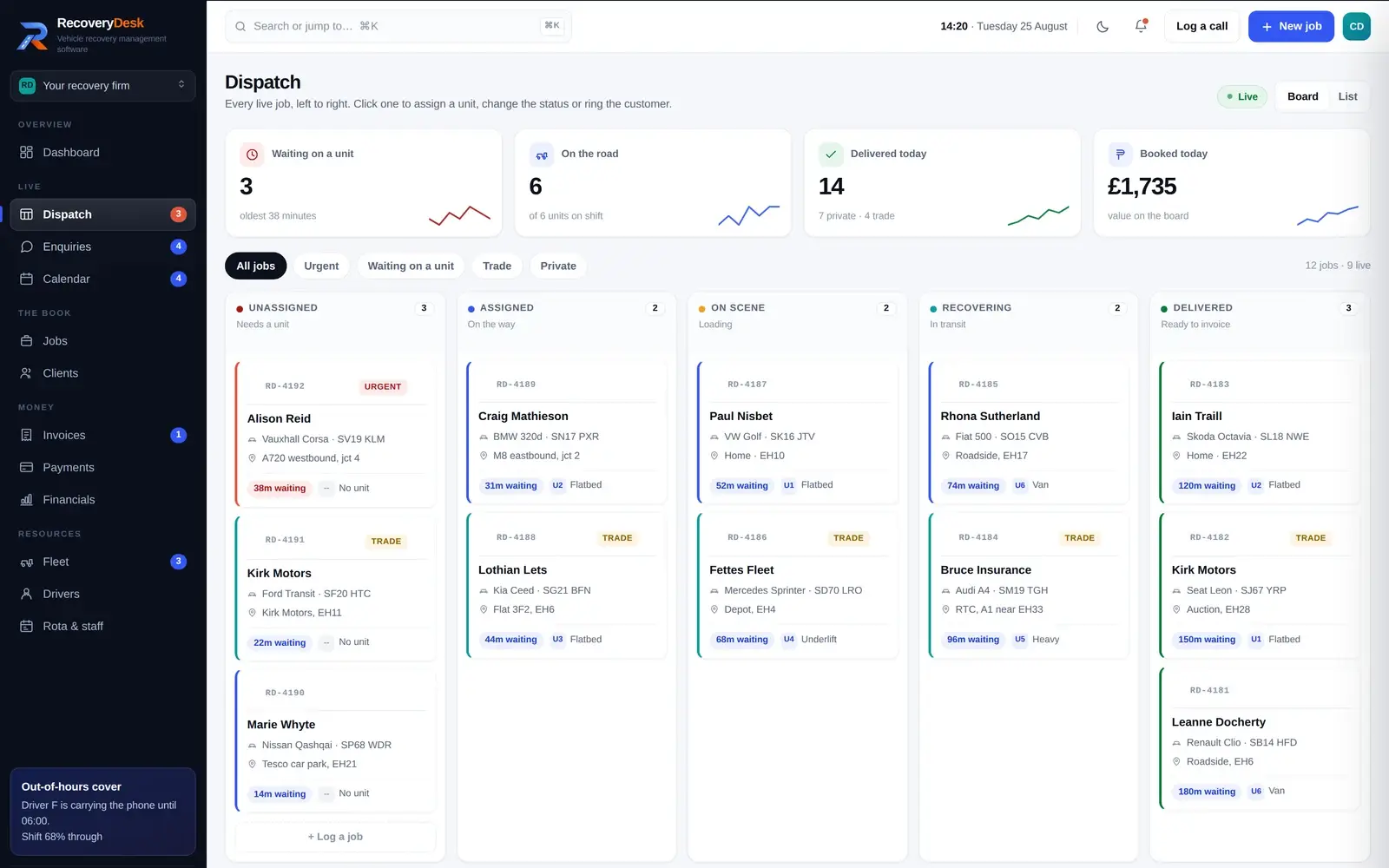
Recovery Desk dispatch board — live jobs by stage, from unassigned through to delivered
Dispatch

Every live job, left to right, by what stage it is actually at. Urgent and trade jobs are marked, each card carries the vehicle and where it is, and the waiting time runs until a unit is put to it. Filter to just the ones with no unit when the phone will not stop.

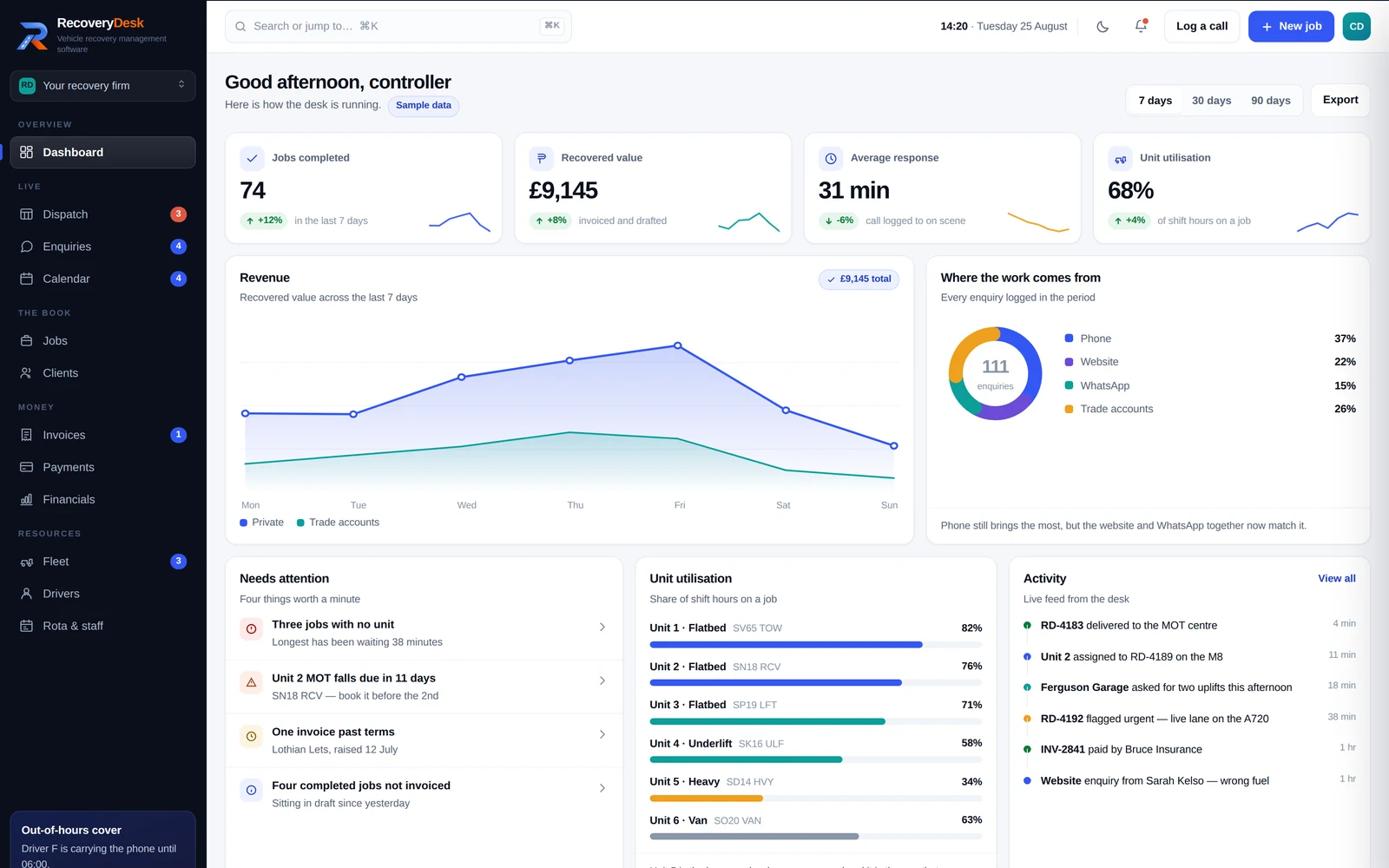
Recovery Desk dashboard — jobs completed, recovered value, average response and unit utilisation, with the four things needing attention
The desk at a glance

Jobs completed, recovered value, average response from call to on scene, and how much of the shift each unit spent on a job — over seven, thirty or ninety days. Underneath, the four things actually worth a minute: jobs with no unit, an MOT falling due, an invoice past terms.

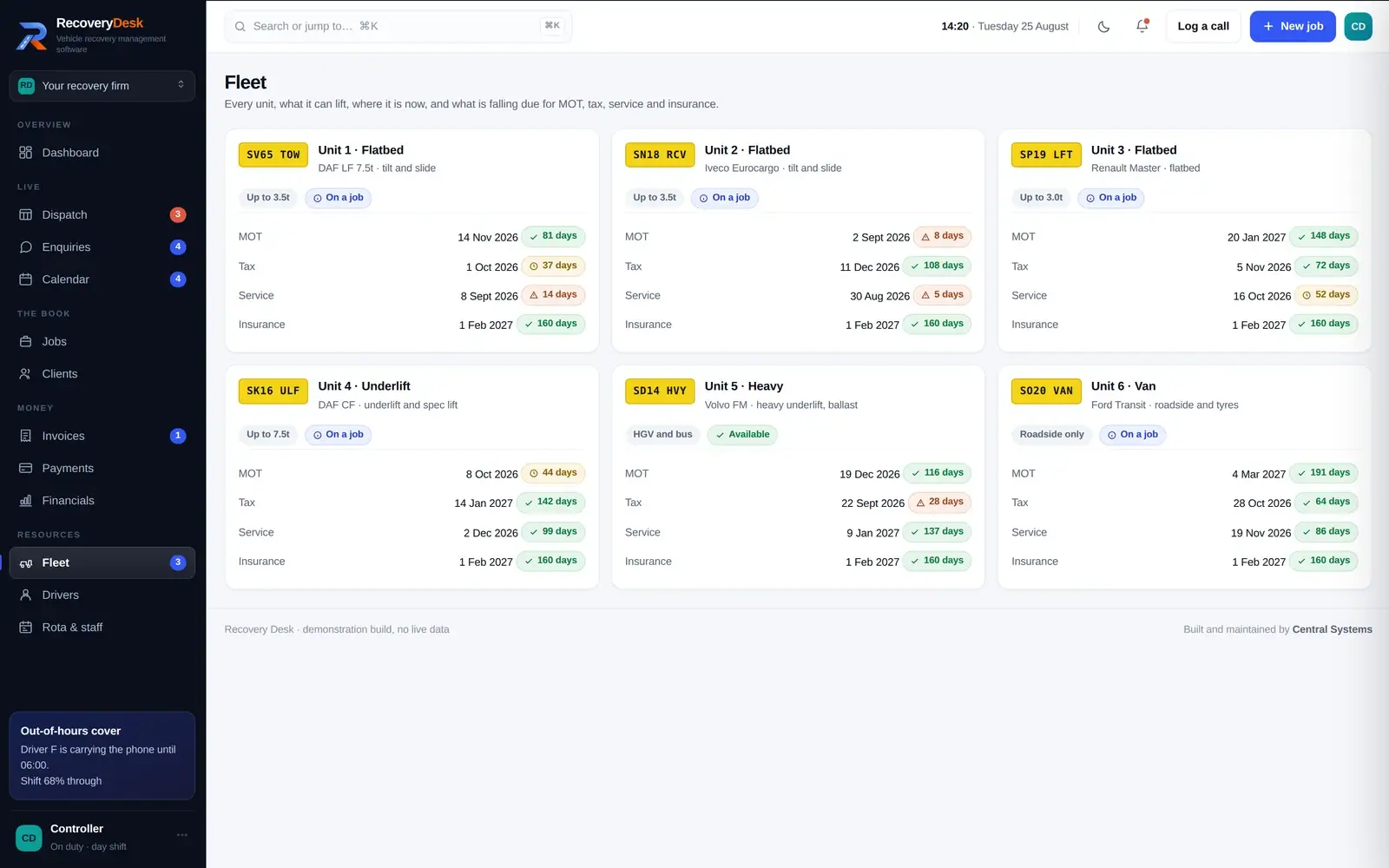
Recovery Desk fleet screen — each unit with its capacity and its MOT, tax, service and insurance dates counting down
Fleet and compliance

Each unit with what it can lift and where it is now, and MOT, tax, service and insurance counting down from today rather than sitting in someone's memory. The same dates appear on the calendar, read straight off the vehicle record.

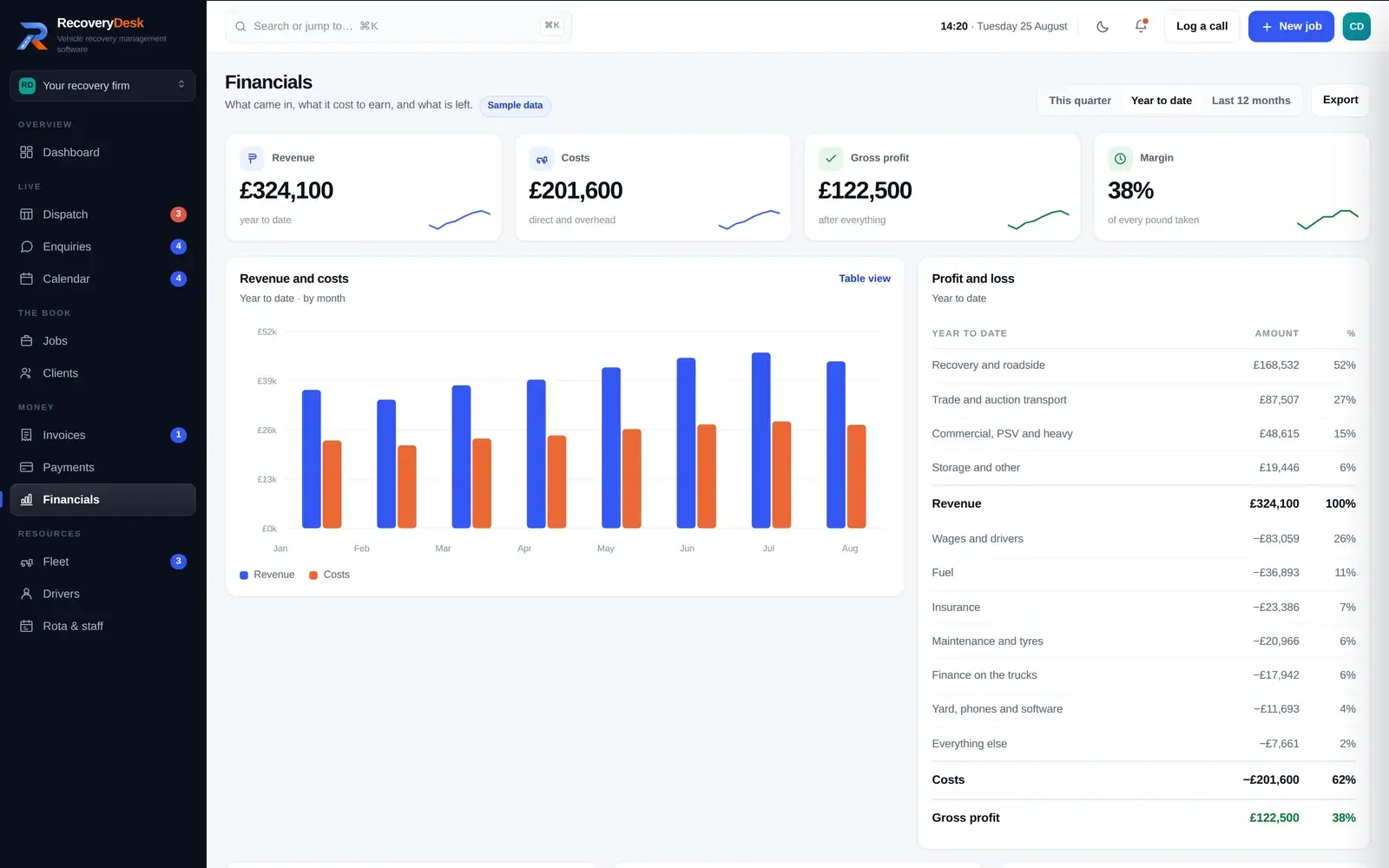
Recovery Desk financials — revenue against costs by month, profit and loss, margin by job type and the aged debt position
What the work is actually worth

Revenue against costs by month, a profit and loss, margin by job type, the VAT position and what is owed to you aged against the open invoices. Scrap uplifts showing a negative margin is the sort of thing an operator wants to see, not have smoothed over.

Why it is not a relabelled CRM

Built around recovery operations

General business software is good at what it was built for. A recovery job is a different shape, and this is where the difference shows.

General-purpose software

Good software, built for a different shape of work
  • A contact, a deal and a stage you have renamed
  • No idea what a unit is, or which one can lift 7.5 tonnes
  • Nowhere for an MOT date, a CPC expiry or a PAS 43 ticket
  • A pipeline that measures weeks, when yours measures minutes
  • Trade accounts on terms handled as if they were one-off sales

Recovery Desk

Built around a recovery job from the start
  • A job with a vehicle, a registration, a start point and a destination
  • Six units with capacities, and a job that knows which one is on it
  • Vehicle and driver dates counting down from today, on the same screen as the work
  • A waiting time per job, and the oldest one at the top of the board
  • Trade accounts with terms and a balance, separate from private customers

None of that is a criticism of general-purpose software — it is doing the job it was designed for. It is the reason we build a system per industry instead of renaming fields in someone else's.

Day to day

What the desk gives you control of

The operational view a controller needs during a shift, and the figures an owner wants at the end of the month.

The oldest wait, not the longest list

The board shows how long each job has been waiting and flags the ones going cold. The dashboard puts the oldest wait on screen next to the count.

Who is on, and who has the phone

The week's rota, who is carrying the out-of-hours phone tonight, and each driver's licence, CPC, medical and tickets with the expiry worked out from today.

Booked work alongside reactive work

Booked collections and trade uplifts on a month, week or agenda view — with the fleet's own MOT, tax and service dates on the same calendar.

The money, without a second system

Invoices built from completed jobs with VAT, card payments taken through Stripe at the roadside or from a link, and what is owed to you aged against the invoices.

Find it by whatever you can remember

The job book searches on reference, registration, customer, route or postcode, and a command palette jumps to a job, an invoice or a client from anywhere.

Utilisation per unit

The share of shift hours each unit actually spent on a job, and revenue against running cost for each one — so the quiet heavy unit can be judged on what it earns per job.

Simple pricing

One monthly price for the standalone system.

How much does Recovery Desk cost?

£90 per month as a standalone product. Discounted pricing is available when Recovery Desk forms part of a wider Central Systems website, automation or business systems package.

Standalone price
£90/ month

One monthly price for the system as it stands. It is not charged per job and not charged per unit, so a month with more shouts does not automatically arrive as a larger bill.

Standalone £90 / month

For operators who already have their website and want the operational side sorted.

Talk to us about Recovery Desk
Central Systems package client Discounted pricing

For clients combining Recovery Desk with a Central Systems website, automation or wider business systems project.

Build my complete system
A monthly subscriptionNot a per-job charge, so a busier month does not automatically mean a larger bill.
Predictable to budgetThe monthly cost does not automatically rise because your job volume rises.
Lower as part of a packageCombined with a website, automation or wider systems project, Recovery Desk is discounted.

How it is taken on

On its own, or as part of a wider system

Three routes. Which one is right depends on what you already have and what is actually costing you time.

Route one

Recovery Desk on its own

The system, used as it stands, at £90 per month, for an operator who already has a website and wants the operational side in one place.

Talk to us about Recovery Desk
Route two

With a Central Systems website

The website and the system as one route rather than two. An enquiry from the site arrives as a record on the desk instead of as an email somebody re-types.

See website design
Route three

Connected to what you already run

Where you already have accounts, a diary or a system that works, the sensible answer is connecting to it. Where a documented route exists we use it, and where it does not we say so.

See business automation

Industry software

Part of a range built one trade at a time

Recovery Desk is the second industry system Central Systems has built. The first was Berevia, for independent funeral directors.

The approach is the same in both cases and it is deliberately narrow: take one industry, model the work as it is actually done, and build for that rather than producing something general enough to sell everywhere. It is why the dispatch board has units and waiting times on it, and why Berevia has a paperwork chain.

FAQs

Questions operators ask about Recovery Desk

What is Recovery Desk?
Recovery Desk is vehicle recovery management software built by Central Systems for recovery operators. It holds the operational side of the business in one place: enquiries, a dispatch board of live jobs, units and drivers, the job book, clients and trade accounts, invoicing and payments, and the fleet's compliance dates. You can open the demonstration and use it.
Who is Recovery Desk designed for?
Vehicle recovery operators — the sort of firm running a handful of units on a mix of private roadside work and trade accounts with garages, dealers, insurers and fleets. The demonstration is built around six units, a rota that includes out-of-hours cover, and a client list split between trade accounts on terms and private customers.
What is vehicle recovery management software?
Software built around a recovery job rather than around a sales pipeline. A job has a vehicle and a registration, a place it is being recovered from and a place it is going to, a unit and a driver against it, and a status that moves as the work does. General business software can be made to hold some of that; it is not shaped for it.
Can Recovery Desk work with my existing website?
Yes. Recovery Desk can be used on its own alongside a website you already have. Where the website is also built by us, the enquiry route is direct — a form on the site arrives on the desk as a record rather than as an email. Where you want to keep your current site, that is a normal way to run it.
Can Recovery Desk be used as standalone software?
Yes. The demonstration is the whole system running on its own — dispatch, enquiries, calendar, jobs, clients, invoices, payments, financials, fleet, drivers and the rota. Nothing in it depends on having a Central Systems website.
Can Recovery Desk be adapted to how our recovery business works?
Adaptation is part of how we work, and it is the honest reason a productised system is worth buying rather than a generic one. What we would want to understand first is how your jobs actually run — where the work comes from, how you split trade and private, and what your invoicing looks like. That conversation comes before any commitment.
Does Recovery Desk replace a generic CRM?
For the operational side of a recovery business, it is doing a different job. A CRM is built to move a contact through a sales pipeline. Recovery Desk is built around a live job with a vehicle, a unit and a status that changes over minutes. If you are using general-purpose software for dispatch today, this is the part it was never shaped for.
How much does Recovery Desk cost?
£90 per month as a standalone product. Discounted pricing is available when Recovery Desk forms part of a wider Central Systems website, automation or business systems package — tell us what the wider project involves and we will set that out.
Is Recovery Desk charged per job or per unit?
Neither. It is a monthly subscription for the system, so the price does not automatically rise because you had a busy month or because a sixth unit went on the road.

See whether it fits how you work

Open the demonstration and use it — it is the whole system on sample data. If it looks close to how your yard runs, the next conversation is about the differences rather than the features.

Central Systems · Leslie, Glenrothes, Fife · 07707 980728