RecoveryDeskA Central Systems product
One operational view of enquiries, dispatch, units and drivers, the job book, clients, invoicing and the money behind it — built around the way a recovery operator actually works, not a general-purpose CRM relabelled.
The short answer
Recovery Desk holds the operational side of a vehicle recovery business in one place. Enquiries arriving by phone, website or WhatsApp and from trade accounts; a dispatch board of live jobs from unassigned through to delivered; the units and drivers those jobs are put to; the job book behind them; clients split between trade accounts on terms and private customers; invoices, card payments and what is owed to you; and the fleet's own MOT, tax, service and insurance dates counting down alongside the work.
That list is not a specification of what could be built. It is the demonstration you can open from this page, running on sample data. Every screen described here is one you can click into and use.
The lifecycle
Five stages, and the job moves through them as the work does. This is the dispatch board's own structure, not a diagram drawn over the top of it.
Calls, website forms and WhatsApp land in one list, oldest first, each tagged with where it came from.
Turning an enquiry into a job carries the location, the vehicle and the contact straight onto the board. Nobody re-types it.
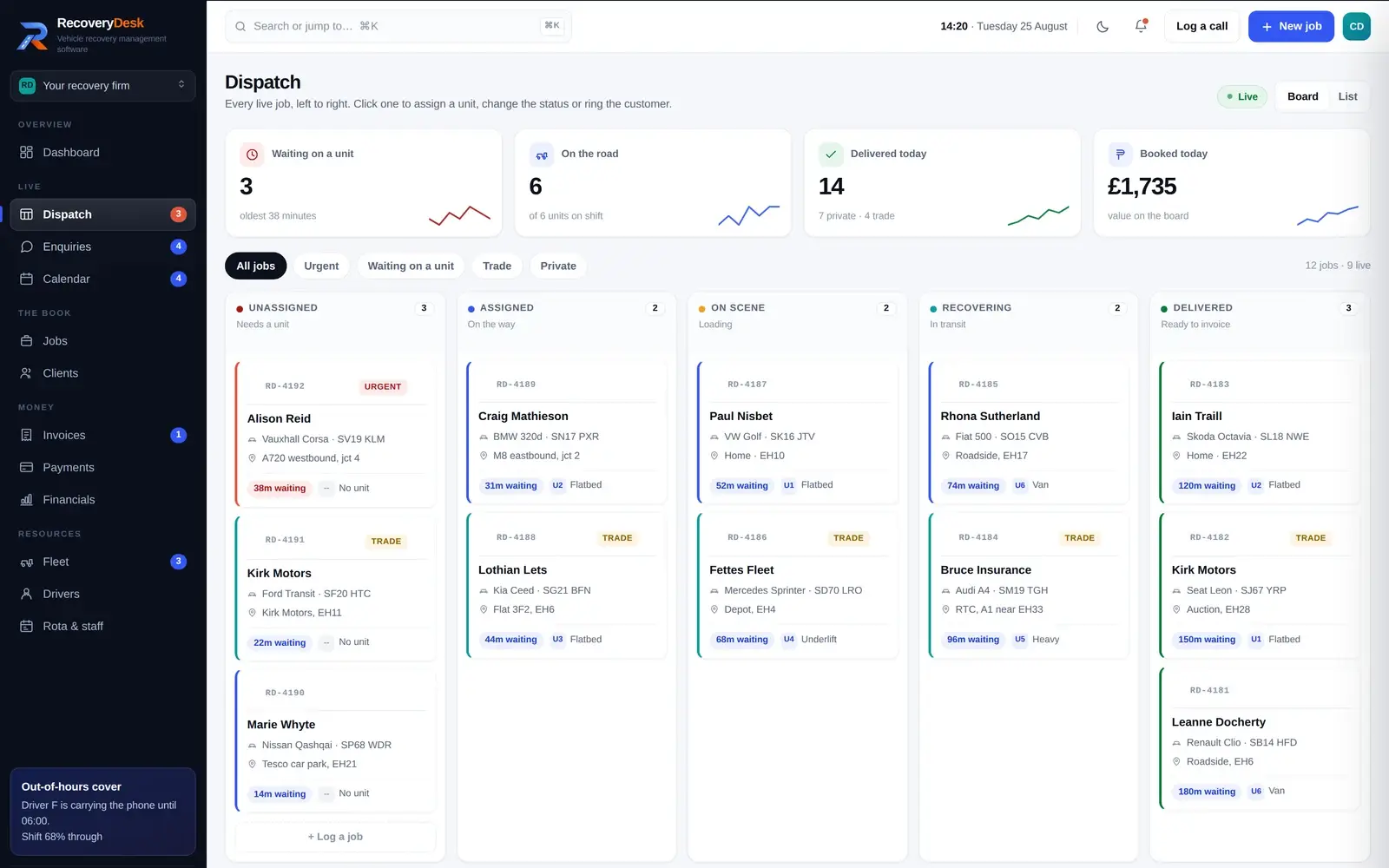
The job sits in Unassigned with a waiting time running against it until a unit is put to it. The oldest wait is on screen.
On scene while it is loading, recovering while it is in transit. The board is the current state of the yard, not a report about it.
Delivered jobs are marked ready to invoice, and the invoice lines are built from the job rather than typed again.
Not a report produced about it afterwards. A job sitting in Unassigned with thirty-eight minutes against it is the thing that needs doing, and it is at the top of the screen because of that rather than because someone flagged it.
See it in action
Captured from the demonstration you can open yourself.

Every live job, left to right, by what stage it is actually at. Urgent and trade jobs are marked, each card carries the vehicle and where it is, and the waiting time runs until a unit is put to it. Filter to just the ones with no unit when the phone will not stop.

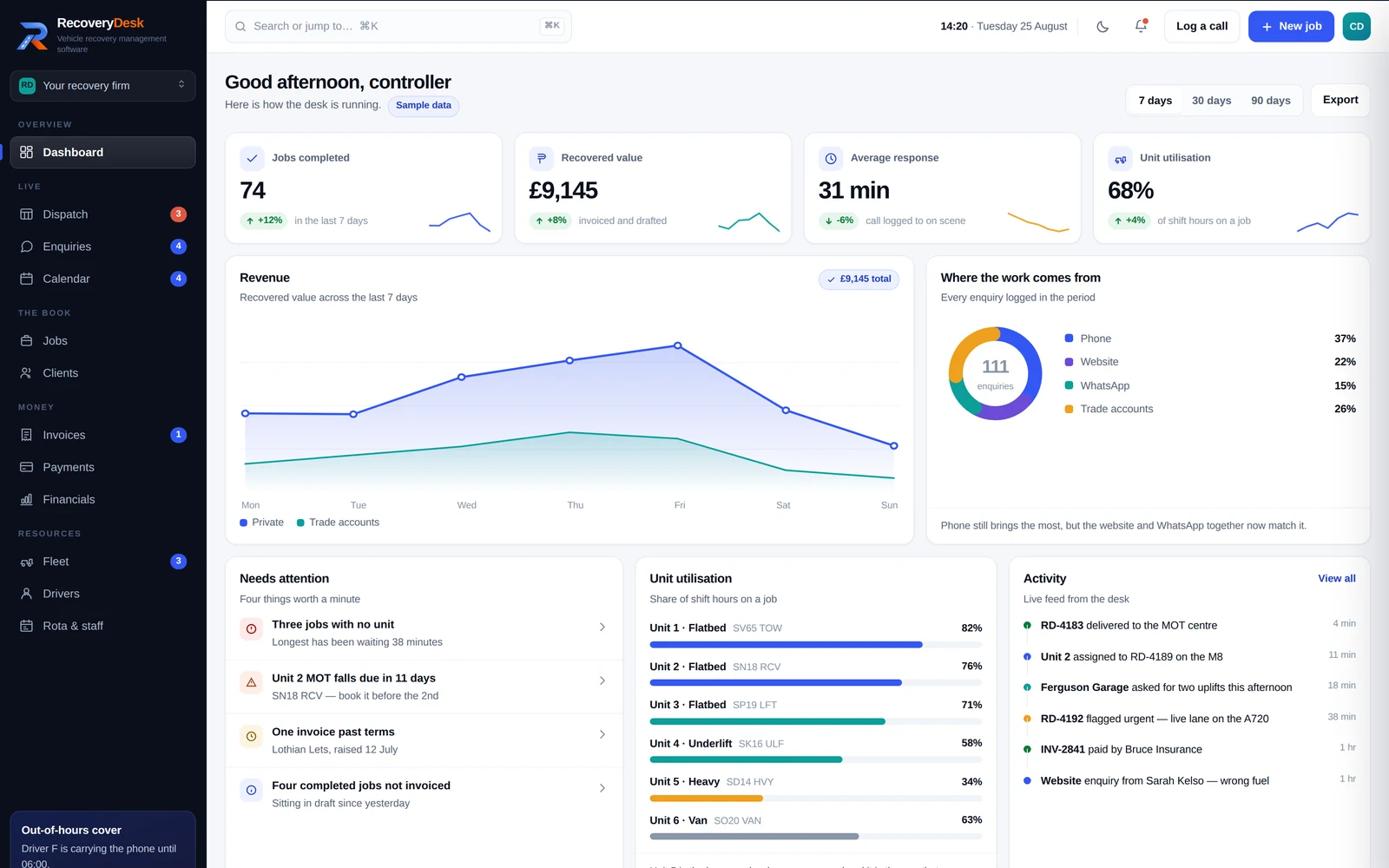
Jobs completed, recovered value, average response from call to on scene, and how much of the shift each unit spent on a job — over seven, thirty or ninety days. Underneath, the four things actually worth a minute: jobs with no unit, an MOT falling due, an invoice past terms.

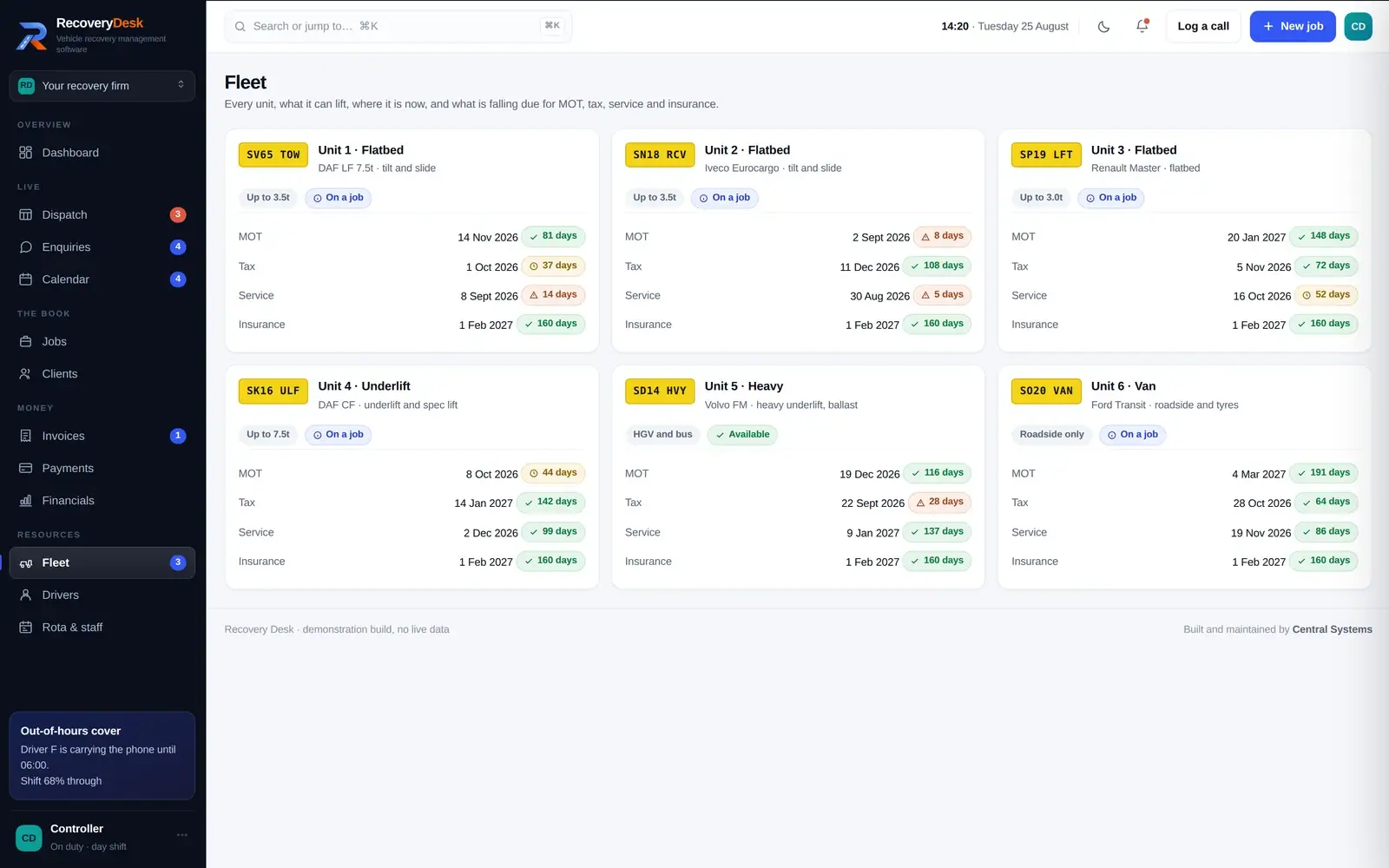
Each unit with what it can lift and where it is now, and MOT, tax, service and insurance counting down from today rather than sitting in someone's memory. The same dates appear on the calendar, read straight off the vehicle record.

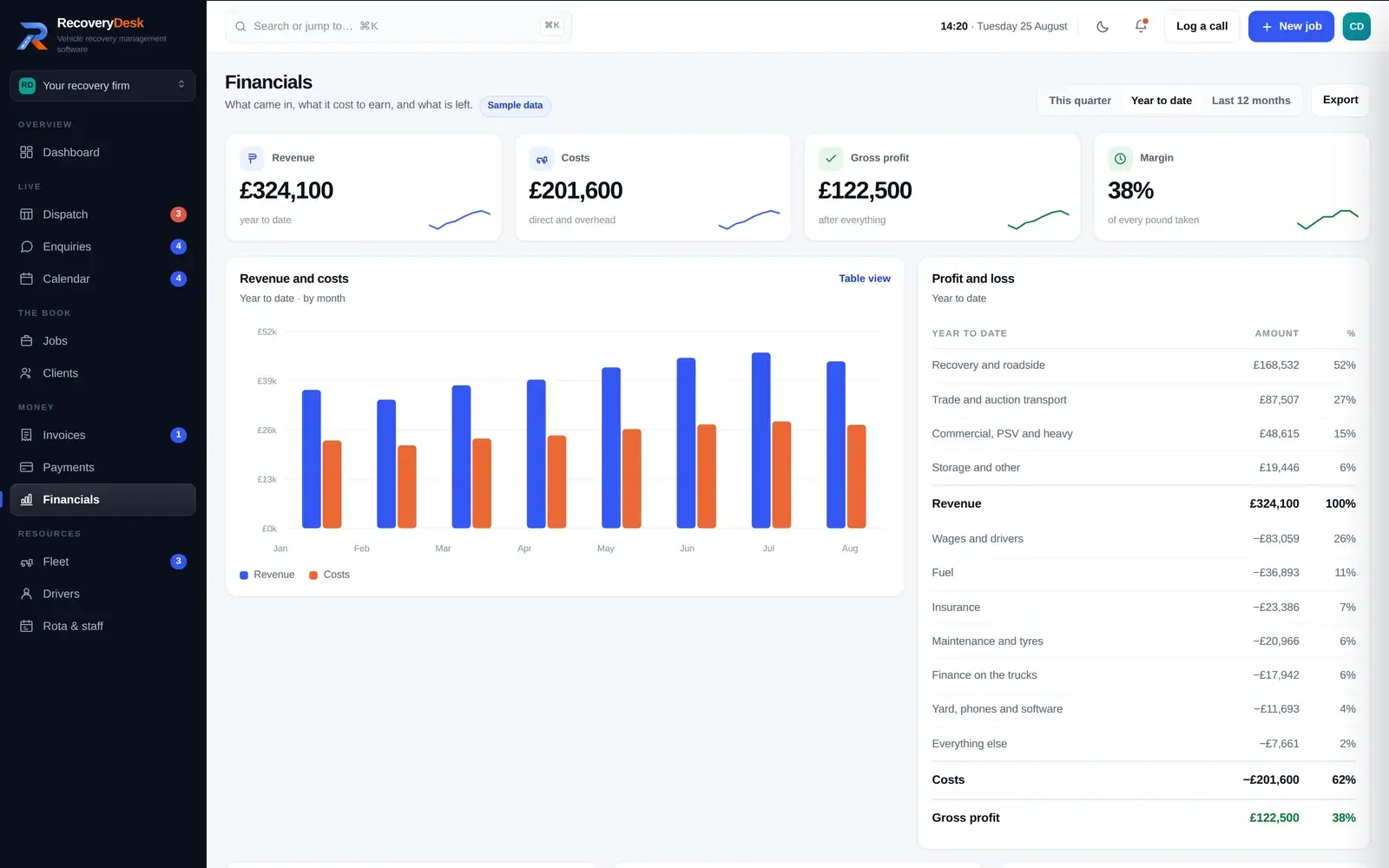
Revenue against costs by month, a profit and loss, margin by job type, the VAT position and what is owed to you aged against the open invoices. Scrap uplifts showing a negative margin is the sort of thing an operator wants to see, not have smoothed over.
Why it is not a relabelled CRM
General business software is good at what it was built for. A recovery job is a different shape, and this is where the difference shows.
None of that is a criticism of general-purpose software — it is doing the job it was designed for. It is the reason we build a system per industry instead of renaming fields in someone else's.
Day to day
The operational view a controller needs during a shift, and the figures an owner wants at the end of the month.
The board shows how long each job has been waiting and flags the ones going cold. The dashboard puts the oldest wait on screen next to the count.
The week's rota, who is carrying the out-of-hours phone tonight, and each driver's licence, CPC, medical and tickets with the expiry worked out from today.
Booked collections and trade uplifts on a month, week or agenda view — with the fleet's own MOT, tax and service dates on the same calendar.
Invoices built from completed jobs with VAT, card payments taken through Stripe at the roadside or from a link, and what is owed to you aged against the invoices.
The job book searches on reference, registration, customer, route or postcode, and a command palette jumps to a job, an invoice or a client from anywhere.
The share of shift hours each unit actually spent on a job, and revenue against running cost for each one — so the quiet heavy unit can be judged on what it earns per job.
Simple pricing
£90 per month as a standalone product. Discounted pricing is available when Recovery Desk forms part of a wider Central Systems website, automation or business systems package.
One monthly price for the system as it stands. It is not charged per job and not charged per unit, so a month with more shouts does not automatically arrive as a larger bill.
For operators who already have their website and want the operational side sorted.
Talk to us about Recovery DeskFor clients combining Recovery Desk with a Central Systems website, automation or wider business systems project.
Build my complete systemHow it is taken on
Three routes. Which one is right depends on what you already have and what is actually costing you time.
The system, used as it stands, at £90 per month, for an operator who already has a website and wants the operational side in one place.
Talk to us about Recovery DeskThe website and the system as one route rather than two. An enquiry from the site arrives as a record on the desk instead of as an email somebody re-types.
See website designWhere you already have accounts, a diary or a system that works, the sensible answer is connecting to it. Where a documented route exists we use it, and where it does not we say so.
See business automationIndustry software
Recovery Desk is the second industry system Central Systems has built. The first was Berevia, for independent funeral directors.
The approach is the same in both cases and it is deliberately narrow: take one industry, model the work as it is actually done, and build for that rather than producing something general enough to sell everywhere. It is why the dispatch board has units and waiting times on it, and why Berevia has a paperwork chain.
FAQs
Related
Open the demonstration and use it — it is the whole system on sample data. If it looks close to how your yard runs, the next conversation is about the differences rather than the features.
Central Systems · Leslie, Glenrothes, Fife · 07707 980728